Work done right.
Turn fabrication knowledge into step-by-step execution.
Turn fabrication knowledge into work done right.
The right operation. The right visual. The right check. One step at a time.
Stop making your best fabricator explain the same job over and over. MasterWork turns manufacturer manuals, fabrication videos, drawings and your shop’s own know-how into step-by-step execution your team follows while they work.
No searching. No guessing. No holding the process in memory.
Every operation is built from the same six parts. Try the sample process.
Your fabrication software knows what to make. MasterWork helps your people make it right.
MasterWork doesn’t replace your fabrication machinery or your existing business software. It helps your people execute the approved process correctly, built from your own approved knowledge rather than invented by AI. A new hire and a skilled fabricator both get the next step, the right visual and a check before moving on.
From source to step. From step to proof.
Most work-instruction systems stop after documenting the procedure. MasterWork is built to run the work.
Bring in the knowledge
Manufacturer videos, manuals, drawings, existing procedures, photos, notes — and what your experienced fabricators know.
Make it executable
Stages, operations, tools, parts, measurements, warnings, visuals, success criteria and required evidence. Not another document — a process you can run.
Keep the source behind it
Every instruction stays linked to its manual page, drawing, video or approved procedure. Workers see what to do; reviewers see why.
Execute the work
One operation at a time. No hunting through folders, no memorizing the sequence, no asking what comes next.
Prove critical work
Require a measurement, photo, checklist or sign-off before the job continues — before more time and material go into a mistake.
Improve the process
See where people stop, which checks fail and where rework begins. Update once; everyone gets the better version.
Fabrication knowledge shouldn’t live in five different places.
MasterWork puts the approved process directly in front of the person doing the work.
The video may contain the answer — the problem is finding it at the moment it’s needed. MasterWork breaks the source into operations, so the worker sees only the relevant one.
Manuals are essential references and poor shop-floor interfaces. The original source stays one tap away. The worker just doesn’t have to start there.
Your fabrication software knows what to make. MasterWork helps your people make it right.
What needs to be produced.
Which profiles and components are required.
What the machine needs to process.
If the source doesn’t support it, MasterWork doesn’t invent it.
AI accelerates the draft. Your expert decides what becomes approved production knowledge.
Explore MasterWork AI →Training happens while the work happens.
Traditional training: learn, wait, forget part of it, ask the experienced fabricator. MasterWork delivers the knowledge at the moment it’s used.
Training becomes production.
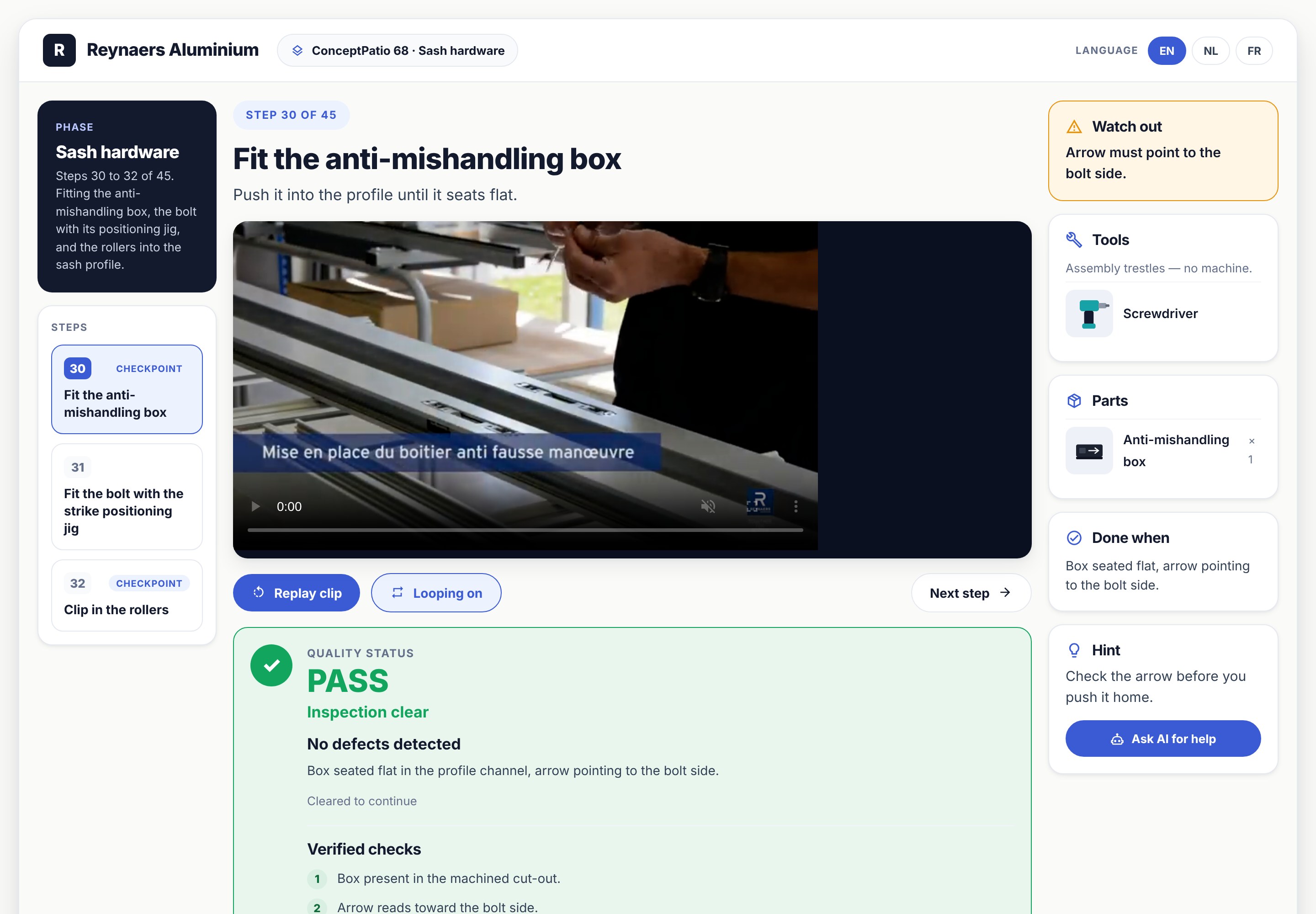
Capture what your best people know before you lose it.
Your best people still define the right way. They just don’t have to explain it every time.
Different systems underneath. One interface for the worker.
Every manufacturer has its own manuals, videos and terminology. The approved process changes; the way your fabricator works doesn’t have to.
Profile prep through machining, hardware, assembly and final checks.
Components, measurements and checks tied to the right configuration.
Complex prep and assembly without dense documentation.
Large processes in controlled stages and station-level work.
Your procedures, manufacturer data and worker know-how combined.
Start with the process that gives you the most trouble.
Don’t digitize the entire shop. Choose the one that:
Your first process is on us.
$0No credit card. No installation. No long-term agreement. For selected fabrication shops.
We’ll be in touch within two business days.
Gather what you have for the process — videos, manuals, drawings, notes. We’ll take it from there.
Put it in front of a real fabricator, on real work.
Design the systems your fabricators build?
We can also carry your training onto the shop floor, so the knowledge stays after the course ends.
Give us one fabrication process.
We’ll show you what happens when the right knowledge reaches the worker at the exact moment they need it.
Get your first process free No credit card. No installation. No factory-wide rollout.