MasterWork
MasterWork · Production management

Know what’s happening. Improve what happens next.

Complete visibility and control over your fabrication operation.

Every fabrication project moves through multiple stages, operations, workstations and quality checks. MasterWork connects those activities into one production management system, giving managers a clear view of what’s happening, what has been completed, what’s delayed and what needs attention.

Track the work. Manage the flow. Improve the results.
Start with one process. See progress and issues without a full rollout. AI drafts it, your expert approves. No credit card.
MasterWork · Factory Control Board
12
Active projects
68%
Overall progress
3
Needs attention
1
Blocked
ProjectPrepFabricationAssemblyQualityDoneStatus
Sliding door · Villa 12
Station 3
Needs attention
Curtain wall · Tower B
Station 1
In progress
Patio system · Lot 7
Station 5
Blocked
Window set · Clinic
QC bay
Verified
Entry door · Hall A
Queue
Not started
1 · One clear picture

Every project. Every stage. One clear picture.

Know exactly where each fabrication job stands.

Managing production shouldn’t require walking from station to station asking for updates. MasterWork provides a central Factory Control Board where managers can oversee fabrication projects as they move through production.

Three answers at a glance: which jobs are moving and which are stuck, where mistakes, delays and rework are happening, and what to do next.
Sliding door · Villa 12 · Assembly
VerifiedIn progressNeeds attentionBlockedNot started
30Fit anti-mishandling boxVerified
31Fit bolt with strike jigVerified
32Clip in rollersNeeds attention
33Fit sash into frameNot started
Station 3 · Operator A. Park · started 12:46
Project view · every step with its status
01
Active projects
What’s currently being fabricated.
02
Production progress
Which stages and operations are complete.
03
Current work
Which station or worker is handling each operation.
04
Upcoming steps
What needs to happen next.
05
Delays and blockers
Where production has stopped or needs attention.
06
Quality status
Which checks passed, failed or require review.
07
Completed work
What has been finished and verified.
2 · Start to finish

Follow the project from start to finish.

Every operation is part of a connected production journey.

A fabrication project isn’t just a task with a start date and a completion date. It’s a sequence of operations, each contributing to the finished product. MasterWork tracks the job as it moves through its approved fabrication workflow.

01Project started
02Preparation
03Fabrication
04Assembly
05Quality verification
06Completed
Within each stage, managers can see the individual steps and their status.
Not started
Waiting to begin.
In progress
Work underway.
Completed
Operation finished.
Needs attention
A problem, failed check or missing requirement.
Blocked
Cannot continue until an issue is resolved.
Verified
Required verification completed.
The manager sees more than a percentage-complete indicator. They understand what has actually been done and what remains.
3 · Keep production moving

The right work. At the right station. In the right sequence.

Production problems often begin between operations. A worker finishes a task, but the next station isn’t ready. A part is missing. A quality check is pending. An operation takes longer than expected. MasterWork helps managers coordinate work across the fabrication process.

01
Manage assignments
See where work is assigned and which operations require attention.
02
Coordinate stations
Understand what each workstation is handling and what is coming next.
03
Manage priorities
Identify urgent jobs and operations affecting the rest of production.
04
Resolve blockers
See problems that prevent work from progressing and coordinate corrective actions.
05
Maintain the sequence
Keep work aligned with the approved fabrication process and required verification steps.
Less uncertainty between stations. Better coordination across the shop.
4 · See where production slows down

Find the bottleneck before it affects the entire project.

A delayed operation doesn’t always look significant on its own. But one slow workstation, repeated failed check or incomplete handoff can affect everything that follows. MasterWork brings activity and progress information together to help managers understand where production needs attention.

01Steps taking longer than expected
02Jobs waiting between stations
03Operations repeatedly interrupted
04Recurring quality failures
05Work requiring supervisor intervention
06Delays that affect downstream operations
07Differences between planned and actual progress
Instead of relying on assumptions, managers can investigate the work that actually happened.
See the problem. Understand the cause. Take action.
5 · Manage the process, not just the project

Improve how the work gets done.

Tracking production is only part of management. The real opportunity is improving the fabrication process itself. MasterWork allows authorized managers and process owners to review the steps workers follow and identify where changes could make production clearer, more consistent or more efficient.

Existing job records preserve the process version used, while updated procedures can guide subsequent work.
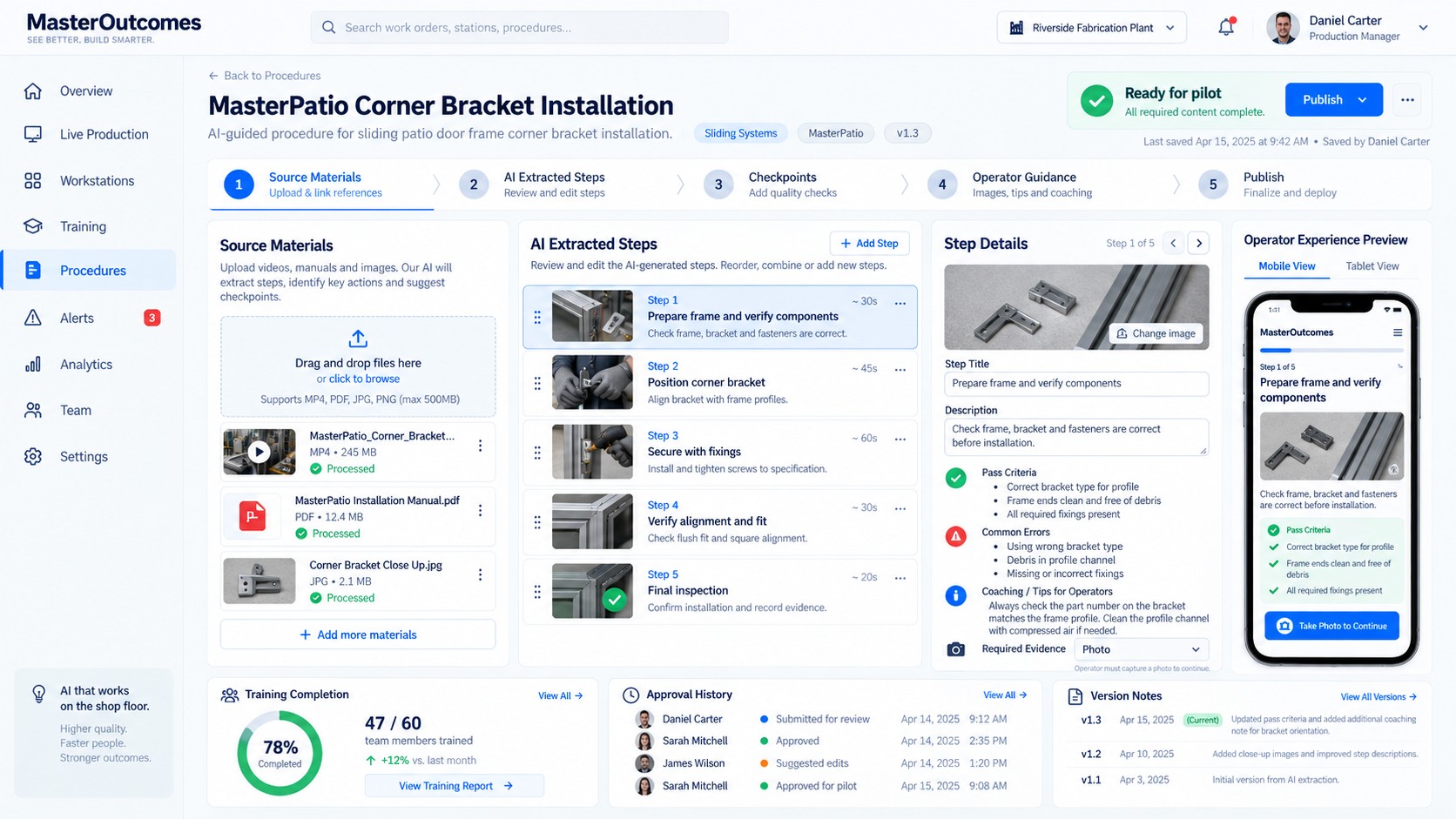
Procedure editor with step guidance
Procedure editor · review, update and publish a new version
01
Improve the steps
Clarify instructions, update visuals, adjust requirements and improve the guidance available at each operation.
02
Improve the sequence
Review how operations are organized and identify opportunities for better handoffs and workflow.
03
Improve quality checks
Add or refine verification points where mistakes repeatedly occur.
04
Improve training
Use production feedback to identify where workers need clearer instructions or additional support.
05
Maintain control
Review and approve process changes before publishing them as a new version.
Don’t just solve the same problem again. Improve the process that created it.
6 · Reports

Reports that explain what actually happened.

Turn fabrication activity into useful production information.

At the end of a shift or project, managers need more than a simple “completed” status. MasterWork organizes the recorded execution history into reports that help teams review production, quality and performance.

Project reports
Review the progress and outcome of an individual fabrication job.
  • Stages and steps completed
  • Execution history
  • Recorded start and completion times
  • Assigned work and station activity
  • Delays and interruptions
  • Quality checks and verification results
  • Corrective actions and approvals
  • Outstanding issues
  • Overall completion status
Production reports
Understand performance across jobs and operations.
  • Jobs completed and still in progress
  • Progress by production stage
  • Operations taking the most time
  • Recurring bottlenecks
  • Quality failure patterns
  • Rework and corrective actions
  • Process changes and their observed results
From individual actions to operational insight.
Every recorded step contributes to a clearer understanding of production.
7 · Quality and production work together

A completed step isn’t always a verified step.

MasterWork connects the execution process with required quality checks. When an operation requires verification, its quality status is visible alongside its production status. Managers can see which checks passed, which need review and which issues need to be resolved before work continues.

This creates a more complete view of the project: not simply how much work is finished, but how much work has been completed correctly and verified.
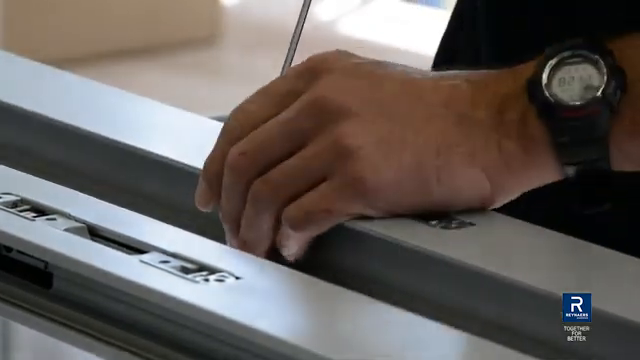
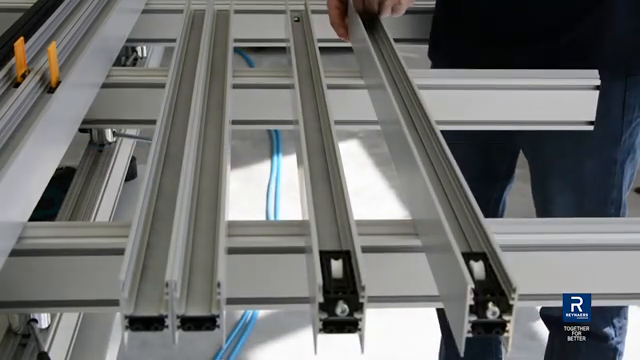
Quality is no longer a separate conversation at the end of production. It’s part of managing the job from beginning to end.
Production status next to quality status
Step 30 frame, checkpoint passedStep 30 · Pass
Completed and verified. Cleared to continue.
Step 32 frame, checkpoint failedStep 32 · Needs attention
Completed but not verified. Reseat and re-inspect.
8 · Improve every day

Every completed project teaches you something about the next one.

One project may reveal a confusing instruction. Another may expose a repeated delay. A third may show that an added verification step prevented a costly mistake. MasterWork helps management bring these observations together.

01
Observe
what’s happening during production.
02
Identify
where the workflow needs attention.
03
Improve
the instructions, assignments, checks or sequence.
04
Approve
changes to the controlled process.
05
Measure
whether subsequent work performs better.
Production → Visibility → Decisions → Improvement
A connected cycle that helps your operation improve through actual fabrication experience.
Optional · MasterWork AI for management

Go beyond reporting. Discover what deserves attention.

For fabrication companies that want advanced capabilities, MasterWork AI can be configured to analyze operational and quality information and recommend opportunities for improvement. AI-assisted analysis can help investigate:

  • Recurring defects and possible contributing factors
  • Steps that repeatedly slow production
  • Instructions associated with quality failures
  • Patterns in corrective actions
  • Opportunities to improve training
  • Changes that may improve production flow
AI provides suggestions and supporting evidence. Your managers remain responsible for reviewing and approving changes.
Fabrication that gets better every cycle.
MasterWork

Give your managers more than a dashboard.

A dashboard shows you what’s happening. MasterWork connects that information to the actual work, the individual steps, the quality checks and the procedures behind production. Your manager can follow the project from start to finish, address problems as they arise, and improve how future work gets done.

See the operation. Manage the work. Improve the process. Deliver better results.
Fabrication that gets better every cycle.
Message received

We’ll be in touch within two business days.